Connectors, Actions, SQL Connector and Indexing API – what's the difference?
amber can access the data in your systems in four ways. They differ in how up to date the data is, how fast amber responds, and whether amber is allowed to change anything in the system.
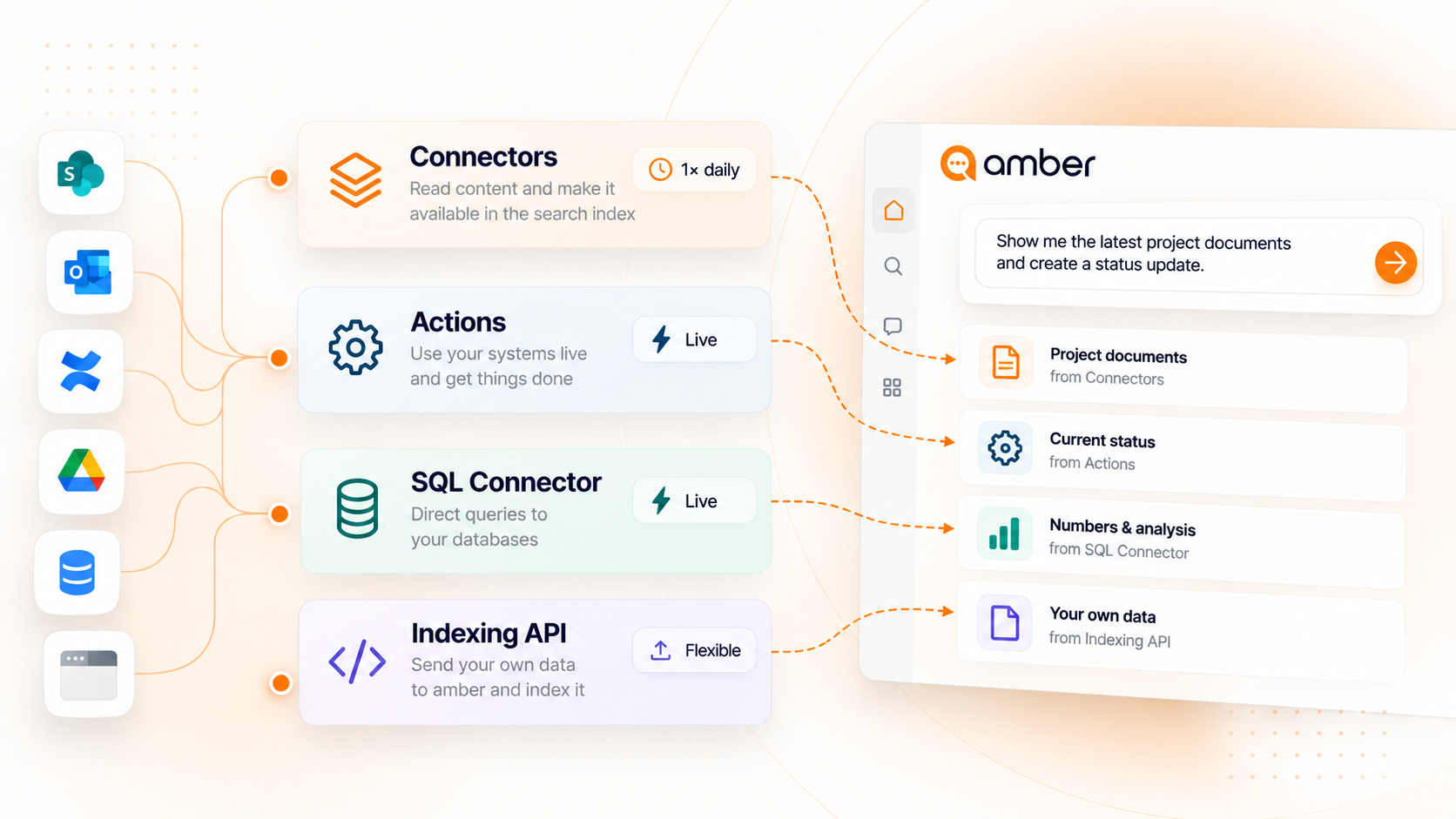
At a glance
Connectors (index)
amber reads the content of your connected systems and stores it in a search index. The index is rebuilt once every night, picking up all changes.
Not up to the minute: Anything added or changed today will show up in amber the next day.
Very fast: In return, your content is searchable in about 0.5 seconds.
Typical examples are SharePoint, Outlook, Confluence or network drives. To learn how to connect a data source, see Which data sources are connected?.
Actions (MCPs)
With actions, amber queries your system live, right at the moment you ask your question.
Up to date: You always get the current state of the system.
Slower: Every request goes to the connected system first, so the answer takes longer than a search in the index.
Write access possible: amber can get things done in the system for you, such as creating a Jira ticket or editing a Confluence page.
⚠️ You decide for each tool whether amber may run it directly or has to ask you first. Be careful with tools that change things in the system.
Learn more in the Overview of amber actions.
SQL Connector (databases)
With the SQL Connector, the language models translate your question into an SQL query and send it directly to your database.
Live queries: amber always works with the current state of the database.
Mathematical analyses: The database itself calculates sums, averages, comparisons or top-10 lists, so you get exact numbers.
Traceable: amber shows you the underlying query so you can check every analysis.
Supported databases are PostgreSQL, MariaDB, MySQL, Oracle DB and Microsoft SQL Server. The SQL Connector is designed for reading only. If you want amber to change data, use an action.
You can find out more here → Set up SQL Database (Beta)
Indexing API
With the Indexing API, you send your data to amber yourself. amber indexes it, and from then on it works just like a connector: quickly searchable in the index.
For any system: Ideal for in-house software, on-premises systems or specialized tools that don't have a ready-made connector yet.
You set the pace: The data is as current as your last transfer. New content becomes searchable within up to 2 hours.
Permissions: You can define for each document who is allowed to see it in amber.
Setting it up requires development work. You'll find all technical details in the Indexing API documentation.
Missing a system? Write to us at support@amber.de. We're happy to consider your requests.